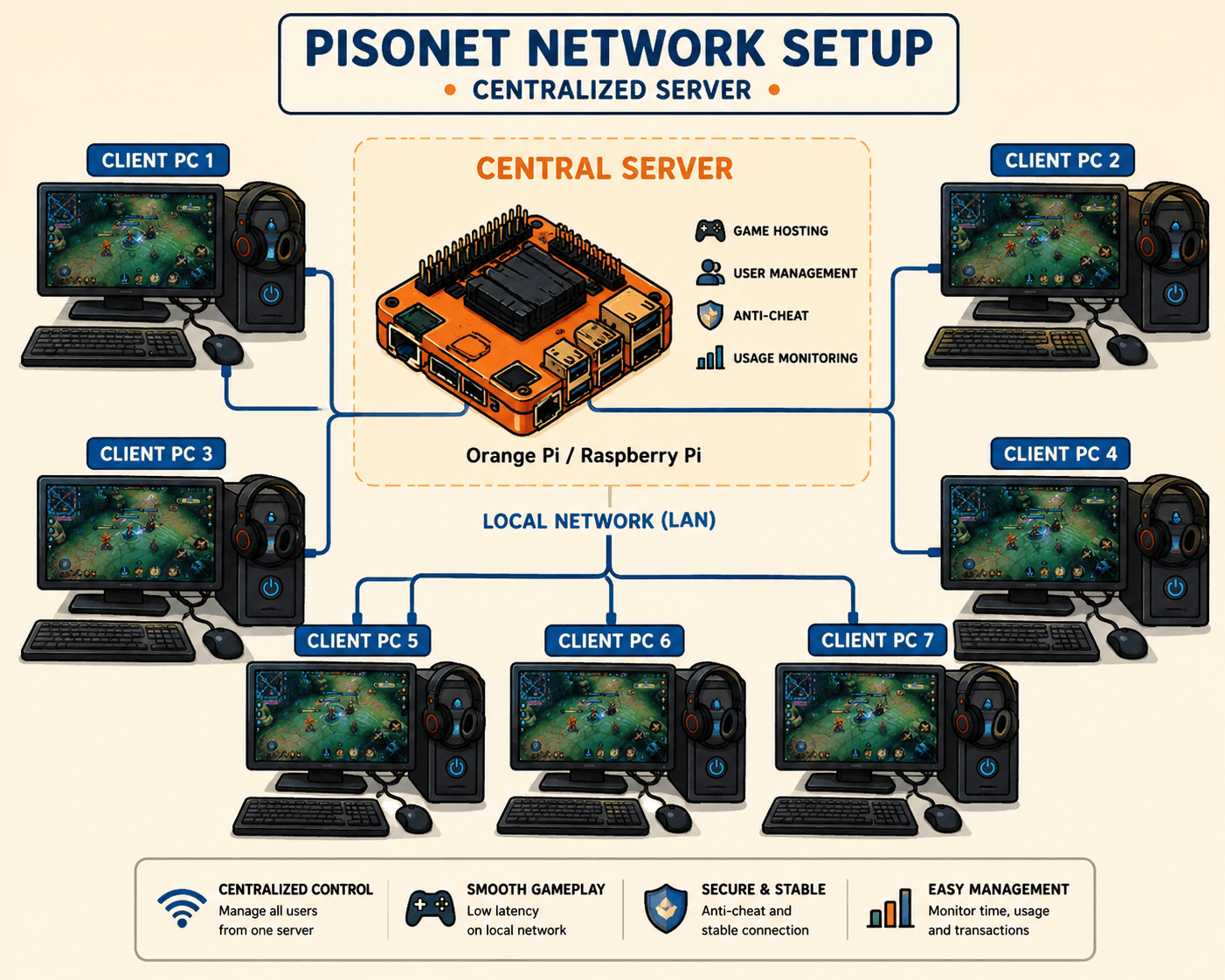
What Is a Centralized PisoNet Server?
A centralized PisoNet server runs your whole café from one device — Raspberry Pi, Orange Pi, or PC. Learn how it works and why your PisoNet needs one.
If you're setting up a PisoNet, one of the first things you'll encounter is the concept of a centralized PisoNet server. But what exactly is it, and why does your PisoNet need one? In short: it's the single device that runs your whole shop — and it's what turns a room full of coin-operated PCs into a business you can manage from your phone.
The Simple Explanation
A centralized PisoNet server is a single device — a small PC, Raspberry Pi, or Orange Pi — that controls all the customer PCs in your shop from one place.
Instead of each PC operating independently (which would be a mess to manage), every café PC connects to the server. The server decides:
- When a session starts and ends
- How long a session lasts based on payment
- What the customer can and can't access
- When to lock the screen after time runs out
Think of it like a traffic controller at an intersection — it doesn't drive the cars, but it tells them when to go and when to stop.
How It Works
Here's the flow of a typical PisoNet session with a centralized server:
- Customer adds time — by inserting coins at the PC, or by spending a balance stored in their member account
- Payment is sent to the server — the server receives the coin signal
- Server unlocks the PC — the customer's screen becomes active for the paid duration
- Server tracks the time — it counts down the session automatically
- Session ends — the server locks the PC screen and waits for the next payment
All of this happens automatically, without anyone at the shop needing to do anything.
Centralized vs. Standalone Coin Boxes
Before centralized management, PisoNets used standalone coin boxes — a separate physical timer and coin mechanism attached to each PC. While simple, this approach had major limitations:
| Feature | Standalone Coin Box | Centralized Server (Pisonex) |
|---|---|---|
| Remote monitoring | ✗ | ✓ |
| Real-time earnings tracking | ✗ | ✓ |
| Change rates without visiting | ✗ | ✓ |
| Member accounts / stored balance | ✗ | ✓ |
| Manage multiple shops | ✗ | ✓ |
| Session history & reports | ✗ | ✓ |
| Cost per PC | ₱500–₱1,500 (per coin box) | One server for all PCs |
The centralized server doesn't just replace coin boxes — it adds capabilities that were impossible before.
What Hardware Can Be the Server?
Your server just needs to be a device that can run the Pisonex server software and stay on 24/7. Common choices:
Raspberry Pi 4 or 5
The most popular choice. Small, cheap (₱3,000–₱5,000), uses only 5–10 watts of electricity, and runs silently. Can handle 30+ café PCs without any issues.
Orange Pi 5
Similar to Raspberry Pi but with a faster processor. Good for larger setups or if you want extra headroom.
Windows PC (Spare Desktop or Laptop)
If you already have an old PC lying around, you can use it as your server. Uses more electricity than a Pi but works just as well with Pisonex.
The server doesn't need to be powerful — it's not running games or heavy software. It just manages sessions, which is lightweight work.
Where Does the Server Live?
The server sits in your shop, connected to the same local network (router/switch) as all your café PCs. It's usually tucked away somewhere — under the counter, on a shelf, or in a back room.
It also connects to the internet so Pisonex can:
- Sync session data to your online dashboard
- Let you monitor your shop remotely
- Apply updates automatically
It Keeps Running Even When the Internet Doesn't
A common worry about a centralized PisoNet server is: "What if the internet goes down — does my whole shop stop?" With Pisonex, no.
Each café PC keeps its own local countdown, so if the network or internet blips, active sessions keep ticking and PCs only lock when time genuinely runs out. The moment the server is reachable again, remaining time re-syncs automatically — the server stays the single source of truth without holding your shop hostage to a perfect connection.
Why Centralized Management Matters for Operators
The biggest advantage is running your shop without being there.
With a centralized server and Pisonex, you can:
- Check earnings from your phone — see today's revenue in real time, anywhere
- Know which PCs are active — without calling someone at the shop
- Change session prices — update rates across all PCs at once from the dashboard
- Get alerts when a PC goes offline — catch problems before customers complain
- Offer member accounts — let regulars store a time balance and come back anytime
- Manage multiple locations — one dashboard for all your shops
This is what makes PisoNet a viable semi-passive income business rather than one that requires constant on-site supervision.
Frequently Asked Questions
Do I need internet on every PC? No. Only the centralized server needs internet (for the cloud dashboard and updates). Your café PCs only need to reach the server over your local network.
What happens if the server or internet goes offline? Active sessions keep running on each PC's local timer and re-sync when the server is back. PCs only lock when time actually hits zero.
Do I need both a server license and PC licenses? Yes. The Server license activates the centralized Pisonex server on your Raspberry Pi or Orange Pi, and a PC license activates the Pisonex client on each café PC. Both are one-time, lifetime purchases.
Summary
| What it is | A single device that controls all café PCs |
|---|---|
| What it runs | Pisonex server software |
| Hardware options | Raspberry Pi, Orange Pi, Windows PC |
| Where it sits | In your shop, on the local network |
| Why you need it | Session control, remote monitoring, unified management |
Ready to run your whole café from one centralized server? Download Pisonex to get started, or view pricing for lifetime license options.
Comments
Sign in to join the conversation.
Sign in to commentNo comments yet. Be the first to comment!